UPSC Prelims Admit Card 2026 Released: Direct Download Link at upsconline.nic.in
Admit Card Released
The Union Public Service Commission has officially activated the e-Admit Card link for the Civil Services (Preliminary) Examination 2026. The exam is scheduled for May 24, 2026.
Download UPSC Civil Services Preliminary Exam e-Admit Card
Download your official UPSC Prelims Admit Card 2026 Released: Direct Download Link at upsconline.nic.in admit card. Check the final exam date, shift timings, and your allotted exam centre details below.
Official Notice
e-Admit Card for Civil Services (Preliminary) Examination 2026
UPSC Prelims Admit Card 2026 Key Highlights
Important Dates
| Event | Date |
|---|---|
| Official Notification & Registration Start | February 4, 2026 |
| Last Date to Apply | Extended to February 27, 2026 |
| e-Admit Card Release Date | May 15, 2026 |
| UPSC Prelims Exam Date | May 24, 2026 |
| UPSC Mains Exam Start | August 21, 2026 onwards |
Exam Shift Timings
| Shift | Reporting Time | Gate Closing | Exam Time |
|---|---|---|---|
| Paper I (General Studies) | 08:30 AM | 09:00 AM | 09:30 AM to 11:30 AM |
| Paper II (CSAT) | 01:30 PM | 02:00 PM | 02:30 PM to 04:30 PM |
Reporting & Gate Rules
Gate Closes
Strictly 30 minutes before the commencement of each session (09:00 AM for Morning Shift and 02:00 PM for Afternoon Shift). No entry allowed after gate closure.
Biometric verification required at the centre
Early Arrival Advice
Candidates are strongly advised to reach the venue at least 60–90 minutes before the scheduled exam time to complete security frisking smoothly.
How to Download UPSC Prelims Admit Card 2026
- Visit the official UPSC application portal at Official UPSC Portal.
- Click on the "Login" link, which will redirect you to the Login page.
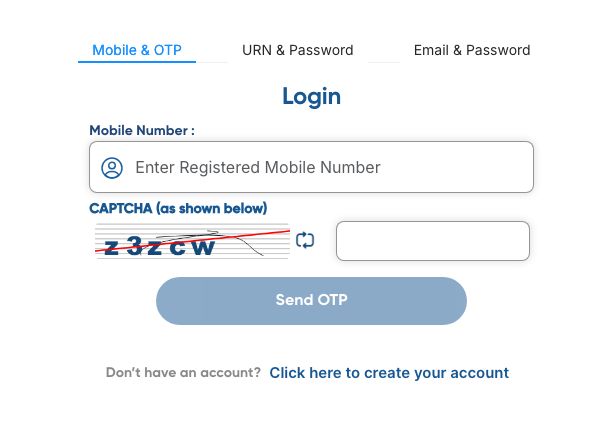
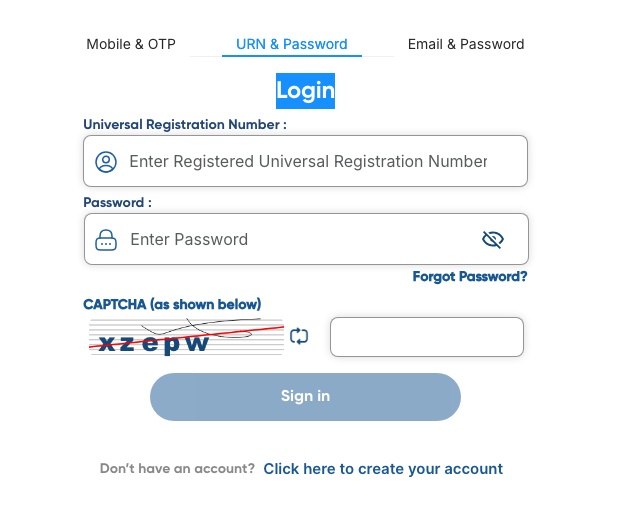
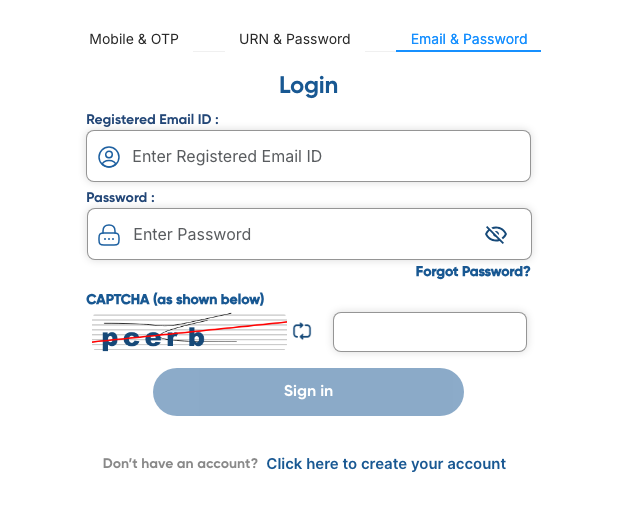
- Choose your preferred login method from the three available tabs:
- Mobile & OTP: Enter your Registered Mobile Number, solve the CAPTCHA, and click "Send OTP".
- URN & Password: Enter your Universal Registration Number (URN), your Password, and the CAPTCHA.
- Email & Password: Enter your Registered Email ID, your Password, and the CAPTCHA.
- Once logged into your dashboard, click on the e-Admit Card download link for the Civil Services (Preliminary) Examination 2026.
- Read the technical instructions, click "Agree," and download the PDF document.
Ready? Click below to open the official portal:
Download UPSC Prelims Admit Card Here →Opens joinindianarmy.nic.in in a new tab
Login Details to Download Admit Card
- Application Number
- Registered Mobile Number + OTP
- Password / Date of Birth
- Universal Registration Number (URN) + Password
- Security Pin
- Registered Email ID + Password
Forgot credentials? See recovery steps ▸
If you have forgotten your OTR password, click the "Forgot Password?" link located under the Email or URN tabs on the login page to reset it using your registered email or mobile number.
Selection Process
- 1 Stage 1: Civil Services Preliminary Examination (Objective) May 24, 2026 (Sunday) upcoming
- 2 Stage 2: Civil Services Main Examination (Written/Descriptive) August 21, 2026 onwards upcoming
- 3 Stage 3: Personality Test / Interview Round February – March 2027 (Tentative) upcoming
Documents Required at Centre
- Printed copy of the UPSC e-Admit Card 2026.
- Original Photo ID Card mentioned on the admit card (e.g., Aadhaar Card, Passport, Driving License, Voter ID).
- Two identical passport-sized photographs (in case of unclear printing on the admit card).
- Black Ball Point Pen (Mandatory).
Prohibited Items
- Mobile phones
- Smartwatches
- Bluetooth devices
- Calculators
- Cameras
- Pen drives
- Bags
- Electronic Gadgets
Dress Code Guidelines
Wear simple, comfortable, and weather-appropriate clothing. Avoid wearing garments with large metallic buttons or heavy embroidery. Electronic watches and smartwatches are completely prohibited; candidates may only wear simple analog watches.
Exam Day Instructions & Rules
- You must mark your answers on the OMR sheet using a Black Ball Point Pen ONLY. The use of pencils, blue pens, or ink pens is strictly prohibited and will result in the rejection of the OMR sheet.
- Entry into the examination venue shall be closed 30 minutes before the scheduled commencement of the Examination. No late entries are permitted under any circumstances.
- Candidates are required to preserve the e-Admit Card safely until the final declaration of the UPSC CSE 2026 results.
Exam Centre Guidance
Map your designated test centre location via Google Maps a day in advance. Avoid using personal vehicles if parking space is unverified; prefer public transport or booked cabs to ensure timely arrival.
Emergency Helpline
If candidates require clarification, guidance, or assistance related to the examination details or technical issues (such as downloading the admit card, registration, or document uploading), they can contact the official helpdesk:
- Helpline Phone Numbers: 011-24041001 or 011-40303444.
- Operating Hours: The helpline is operational from 10:00 AM to 5:30 PM on all working days.
- Official Email ID:
[email protected].
Related Updates for UPSC Civil Services Examination
Frequently Asked Questions
You can download it by logging into the UPSC OTR portal using one of three methods: your Registered Mobile Number (via OTP), your Registered Email ID (with password), or your Universal Registration Number (URN) with your password.
Yes, the Union Public Service Commission released the e-Admit Card for the Civil Services (Preliminary) Examination on May 15, 2026.
No, candidates must strictly use a Black Ball Point Pen to fill out the OMR answer sheets and attendance lists.
To download your e-admit card, visit the official UPSC portal at upsconline.nic.in and click on the "e-Admit Card" link. You will be redirected to the OTR (One Time Registration) login page. You can log in using any of these three methods: Registered Mobile Number (via OTP), Registered Email ID (via Password), or Universal Registration Number (URN) (via Password). Once logged in, click the download link for the Civil Services (Preliminary) Examination 2026 and save the PDF.
If your photograph is not visible, you must bring two identical passport-sized photographs to the exam venue, along with an undertaking and a valid original photo identity proof.
No, the Union Public Service Commission does not entertain any requests for changes to the allocated examination center, date, or shift timings under any circumstances.
No, a clear black-and-white printout on standard A4 paper is perfectly acceptable, provided your name, photo, and roll number are easily readable.

Founder & Lead Exam Analyst
Ameer M is the Founder of GovtJobsNet.com and a Certified Career Counselor with over 5 years of experience analyzing government job trends. He specializes in guiding aspirants through competitive exams using verified data sourced directly from official recruitment boards and RTI responses.