SSC GD City Intimation Slip 2026 OUT (Live): Direct Link @ ssc.gov.in
The Staff Selection Commission (SSC) has officially activated the Exam City Intimation links for the Constable (GD) Examination 2026. The Computer-Based Test (CBT) is scheduled to be conducted nationwide from 27 April to 30 May 2026. Candidates can now select their respective regional portals from the table below to check their assigned exam city, date, and shift timings.
Direct Region-Wise Links to Check SSC GD City Intimation
Candidates must download their City Intimation Slips from their respective regional SSC websites. Find your state in the table below and click the direct link to access your specific regional login portal:
| SSC Region | States / UTs Covered | Direct Regional Link |
|---|---|---|
| Northern Region (NR) | Rajasthan, Delhi, Uttarakhand | Direct Link |
| Central Region (CR) | Uttar Pradesh, Bihar | Direct Link |
| Eastern Region (ER) | West Bengal, Sikkim, Odisha, Jharkhand, A&N Island | Direct Link |
| Western Region (WR) | Maharashtra, Gujarat, Goa, Daman, Diu, Dadra & Nagar Haveli | Direct Link |
| Southern Region (SR) | Andhra Pradesh, Telangana, Tamil Nadu, Puducherry | Direct Link |
| North West Region (NWR) | Haryana, Punjab, J&K, Himachal Pradesh | Direct Link |
| Karnataka Kerala Region (KKR) | Karnataka, Kerala, Lakshadweep | Direct Link |
| North East Region (NER) | Assam, Arunachal Pradesh, Meghalaya, Manipur, Tripura, Mizoram, Nagaland | Direct Link |
| Madhya Pradesh Region (MPR) | Madhya Pradesh, Chhattisgarh | Direct Link |
How to Check Your SSC GD Exam City 2026
Step-by-Step Guide to Download SSC GD City Intimation Slip 2026
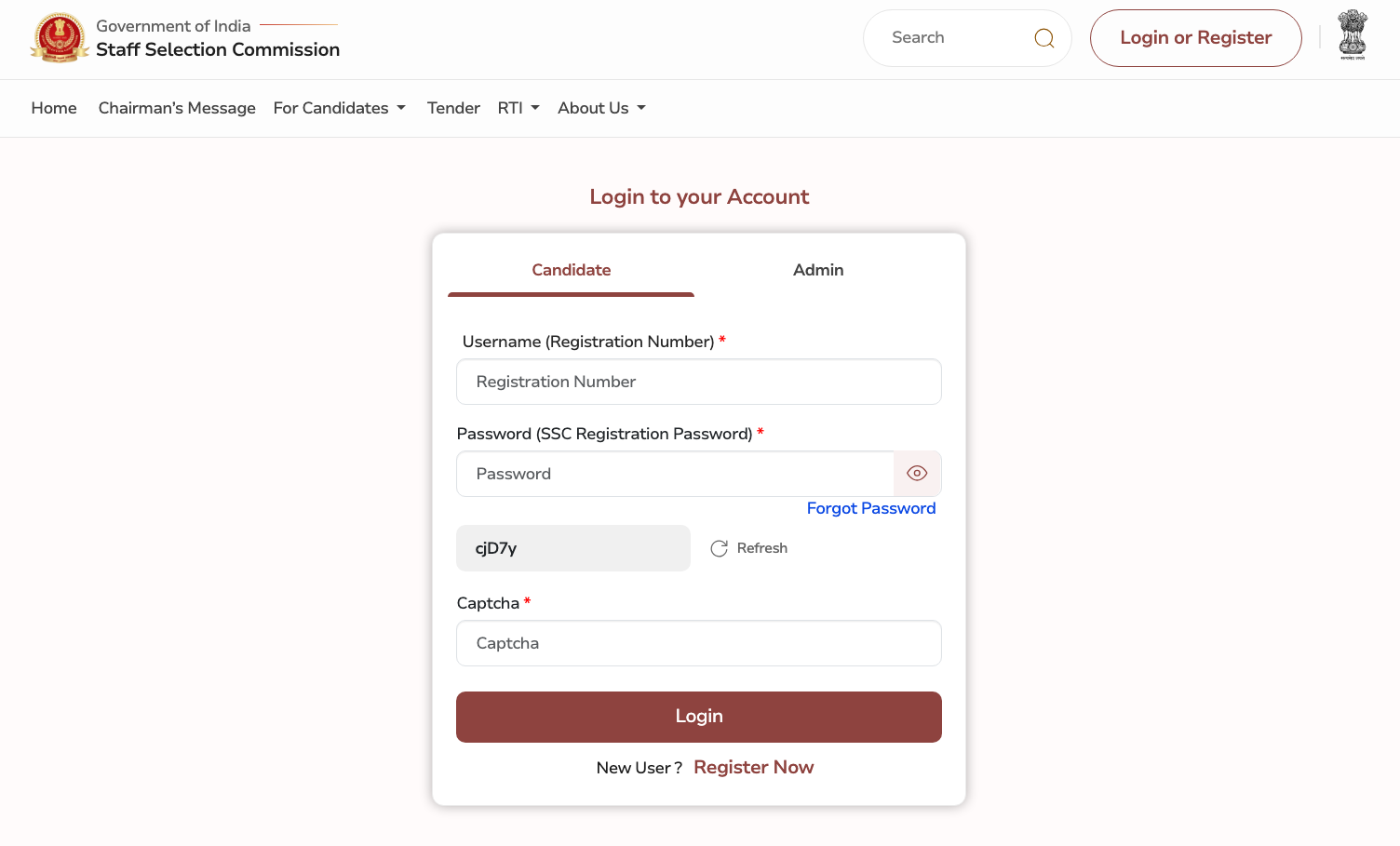
Candidates can download their exam city slips either through their respective regional portals or directly via the Staff Selection Commission's central OTR (One Time Registration) system. Follow these instructions for a hassle-free download:
- Step 1: Visit the newly launched official SSC portal at ssc.gov.in.
- Step 2: Locate the Login/Register section prominently displayed on the right side of the homepage.
- Step 3: Enter your exact Registration Number and Password.
- Step 4: Type the security captcha code shown on the screen and click 'Login' to access your candidate dashboard.
- Step 5: Click on the active link labeled "City Intimation Slip – GD Constable 2026".
- Step 6: Your allotted exam city, scheduled date, and shift timings will appear. Click the print icon to save it as a PDF or take a physical printout for your records.
Forgot SSC Registration Number or Password?
If you have lost your login credentials, do not panic. The SSC provides a straightforward recovery process:
- Click on the "Forgot Password / Registration ID" link located just below the login button on
ssc.gov.in. - Select your permanent State from the dropdown menu.
- Enter either your registered Email ID or Mobile Number.
- You will receive an OTP (One Time Password). Enter the OTP to retrieve your Registration Number and create a new password.
Important Exam Dates & Admit Card Rules
Before you finalize your travel plans, please note these crucial official guidelines regarding the Computer-Based Test (CBT):
- Official Exam Dates: The SSC GD Constable CBT is officially scheduled to run from 27 April to 30 May 2026 across multiple shifts nationwide.
- Purpose of the Slip: It is critical to understand that the City Intimation Slip is NOT your Admit Card. It is released well in advance solely to inform you of your allotted city and date for travel planning. It does not contain your exact exam venue and will not grant you entry into the examination hall.
- Admit Card Release Date: As per the official SSC notice, the actual SSC GD Admit Card 2026 (Admission Certificate)—which contains your exact exam center address, venue code, and roll number—will be available to download exactly 2 to 3 days prior to your specific scheduled exam date.
Details Mentioned on the City Intimation Slip
When your slip loads on the screen, please verify the following details carefully:
- Candidate's Name and Registration Number
- Father's Name
- Date of Birth
- Exam DateExam Shift (Shift 1, 2, 3, or 4)
- Reporting Time
- City of Examination
Frequently Asked Questions
Yes, the SSC has officially released the exam city intimation slips. Candidates can check their allotted city and exam date by logging into their respective official SSC regional websites.
Your exact exam center address will NOT be on the city intimation slip. The full address will only be printed on your final SSC GD Admit Card, which you can download 2 to 3 days prior to your specific exam date.
You can retrieve your registration number by checking your registered email inbox or SMS for messages from the SSC. You can also use the "Forgot Password/Registration" link on the SSC login page by providing your Name, Father's Name, and Date of Birth.
Due to lakhs of candidates checking their status at the same time, regional servers may experience heavy load or downtime. Please be patient, refresh the page after a few minutes, or try logging in during off-peak hours (late night or early morning).
If your status is not found, first ensure you are checking the correct regional SSC website where you submitted your application. Double-check your Registration Number and Date of Birth. If the error persists, it may mean your application was rejected, or the region's database is still updating.
No, the city intimation slip is strictly for your travel planning and is not an official entry document. You will only be allowed entry into the exam center with your official, printed SSC GD Admit Card and a valid original photo ID.
No. The Staff Selection Commission (SSC) no longer sends admit cards or city intimation slips via postal mail. Candidates must download and print their admission certificates online through their respective regional SSC portals.
To download the slip as a PDF, visit your regional SSC login portal and enter your Registration Number and Date of Birth. Once your exam city details appear on the screen, use your browser's "Print" function (Ctrl+P or Cmd+P) and select "Save as PDF" to keep a copy on your device.
For the SSC GD city intimation slip 2026 login, you need two credentials: your 11-digit SSC Registration Number and your Date of Birth (used as your password). Enter these details along with the verification captcha on your regional SSC website to check your city.
The official website to check your SSC GD exam city 2026 is the new portal at ssc.gov.in. However, candidates must use their specific regional SSC websites (like sscnr.nic.in or sscsr.gov.in) to access the direct login link and check their status.